Broker Attribution FAQ
The NAR 2022 MLS Policy Changes include a requirement for Broker Attribution, which is required to be live by 9/1/22. This is not a policy that MLSs can opt out of, as it is considered mandatory by the NAR. However, we will have the capability to turn off the Broker Attribution setting at the individual MLS level (international MLSs, non-NAR MLSs). The NAR MLS Policy Changes can also be found here.
The Broker Attribution requirement is below:
12. An MLS participant’s IDX display must identify the listing firm, and the email or phone number provided by the listing participant in a reasonably prominent location and in a readily Page 4 of 7 visible color and typeface not smaller than the median used in the display of listing data.
The following are frequently asked questions about the Broker Attribution setting.
Q: Where is Broker Attribution enabled for brokers?
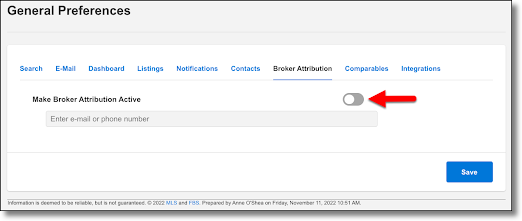
This is found in Preferences > General Preferences. There will be a Broker Attribution tab, and from here, this setting can be enabled.
Q: Is Broker Attribution on by default?
No, if an office wants to use Broker Attribution, they must enable it at the office level. From the office account (or user with office level brokerload), go to General Preferences, select Broker Attribution, and toggle Make Broker Attribution Active on.
Q: Which option should the office select?
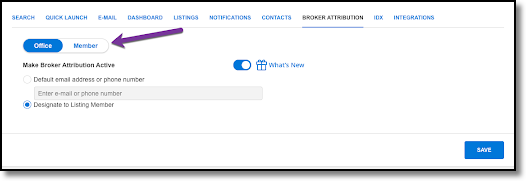
The option for Default email address or phone number sets a default email address or phone number for all listings within the office. All listings within the office will use the email address or phone number and the Broker Attribution cannot be modified on a per listing basis.
The option for Designate to Listing Member will put the responsibility on the individual members within the office. When turned on, members within the office can go to their General Preferences, select Broker Attribution and toggle Make Broker Attribution Active to On. Then they can enter in the default email address or phone number to display on their listings.
Q: Can Brokers set their own attribution?
Yes, there's a toggle in the Broker Attribution General Preferences that will let brokers change access to this setting to either the entire office or their own listings.
By default, the broker will be editing the settings for their Office. If they choose the option Designate to Listing Member, they can then change the toggle from Office to Member and set the Broker Attribution for their own listings.
Q: Where does Broker Attribution appear?
This will appear on public facing links such as IDX, Portals, Emails, Shared Links, and Classic portals. This will also be available in RETS Feeds and in the API.
Q: How does this look?
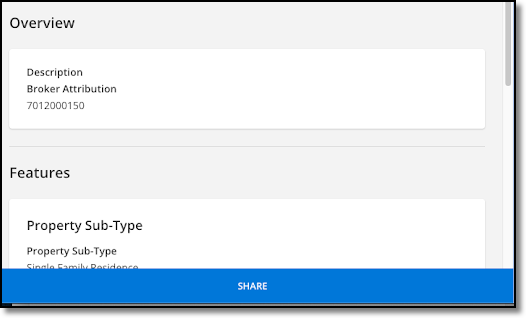
Emails, shared links, and portals will appear as their own section towards the top of the page:
Classic portals and IDX links will have the Broker Attribution display in the disclaimer of the page:
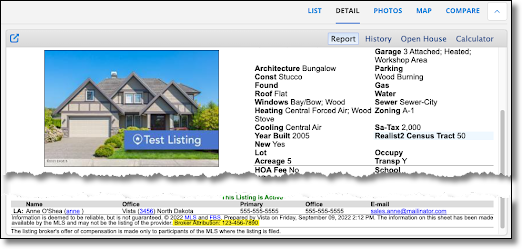
Q: The broker has enabled Broker Attribution and designated this to members. What happens if a member doesn't enable Broker Attribution?
Nothing. If Broker Attribution is designated to a Listing Member, that Listing Member must enable Broker Attribution, otherwise Broker Attribution will not appear for that agent's listings.
Q: Can Broker Attribution be edited on a per listing basis?
Yes, but only if the broker has turned on Broker Attribution and selected the option to Designate to Listing Member. Then the Broker Attribution can be edited on a per listing basis.
When the office member enables the Broker Attribution in General Preferences, they will see an option for Broker Attribution when adding the listing. This is pre-populated with what the user has set in General Preferences, but can be updated manually.
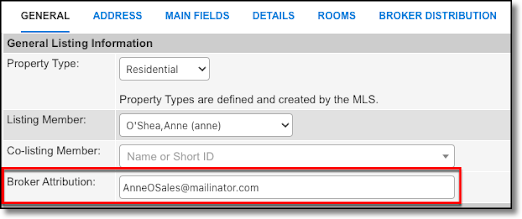
When editing a listing, the member can select the option for Listing/Selling Member and manually edit the Broker Attribution.
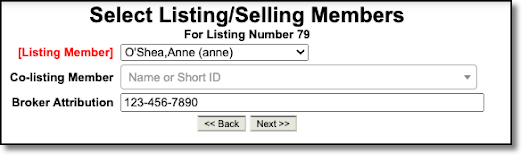
Q: Can a default Attribution be set up automatically if the Broker enables Broker Attribution, such as the member’s email address?
No, this is a manual process to set up Broker Attribution and must be manually set and enabled at the agent level if the broker designates attribution to members.
Q: Where can admins find a report of brokers who have the Broker Attribution feature turned on? Is there one?
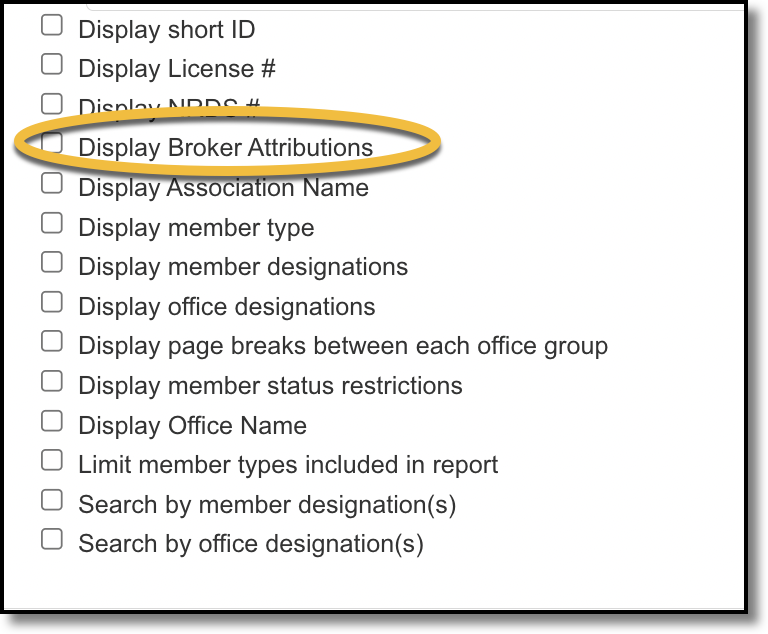
In the Roster report page in Flexmls, there is a checkbox for Broker Attribution in the list of items you can select for running a Roster report. When you check this box and then run the Roster report, the report will include a column for Broker Attribution.