Broker Distribution (Admin)
Click Broker Distribution under General on the Admin menu to select the distribution options to make available on the Broker Distribution tab in Listing Maintenance (the Add or Change Listing pages).
Note
Depending on your MLS settings, office accounts may also have access to the Broker Distribution option (under Preferences on the menu). For more information about broker distribution settings for offices and companies, see Manage Broker Distribution Options (Office/Company) on help.flexmls.com.
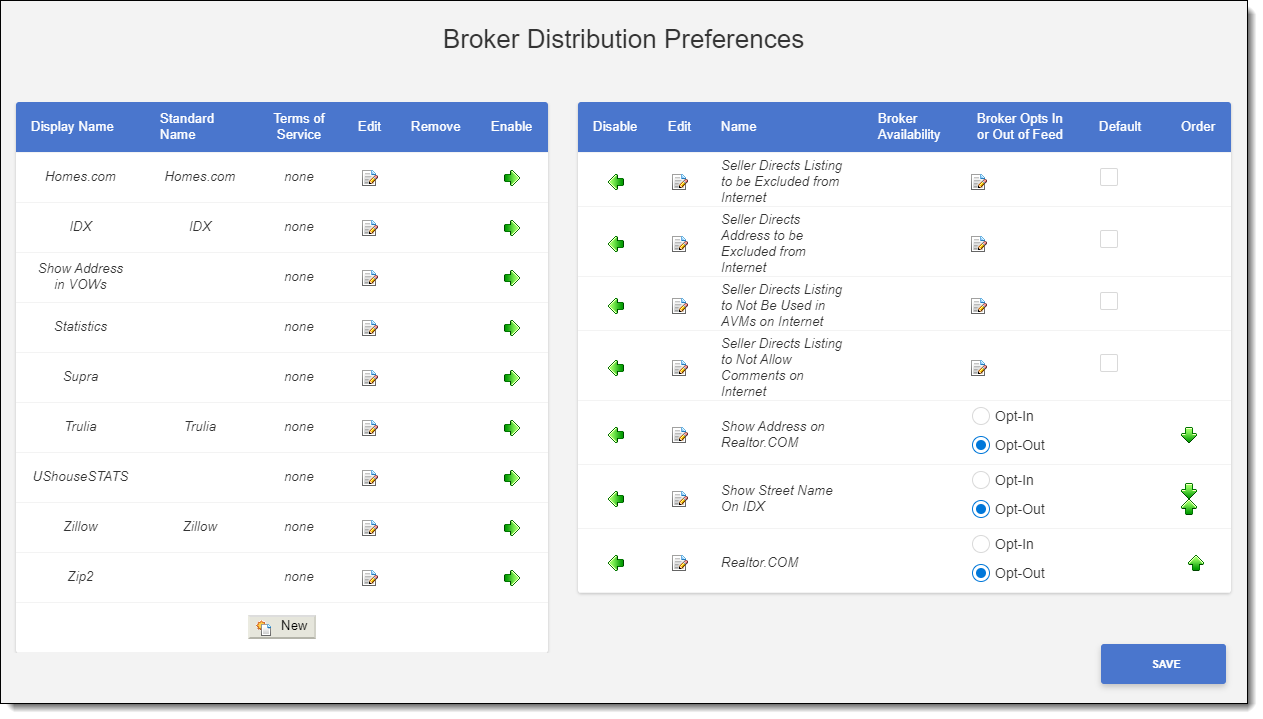
The left side of the page lists the distribution options that are available but not enabled. To enable an option, click the Enable (right arrow) button.
The right side of the page lists the distribution options that are currently enabled (displayed on the Broker Distribution tab in Listing Maintenance). To disable an option, click the Disable (left arrow) button.
In the Broker Availability column, you can select which brokers have access to custom distribution options that have been created for your MLS. (These settings are not available for standard distribution options.)
Full - The custom distribution option will be available in Listing Maintenance for all members and brokers.
Partial - Click Configure to select the brokers who have access to the custom distribution option.
In the column called Broker Opts In or Out of Feed, select whether the option will be selected by default. If Opt-In is selected, the broker must manually select the distribution option. If Opt-Out is selected, the broker must manually select to exclude that option.
Distribution names in italics cannot be removed or renamed but can be enabled or disabled.