Permission Presets
To make user management easier in Flexmls, you can set up permission presets, which are templates that allow you to quickly assign permissions to a new user. Create permission presets to set up standard permissions for specific user groups or roles, such as agents, brokers, and office staff.
Note
Permission presets cannot be inherited. They can be assigned only on the Settings tab for an individual user.
Save a New Preset
To create a new permission preset, you must first set up a member with the appropriate permissions. After you have set permissions for the member, click Save Preset and then name the template.
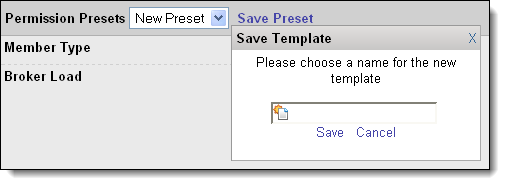
When adding future users, the permission preset will be available in the Permission Presets drop-down list on the Settings tab. To set up a new preset after saving the first, make sure to select New Preset from the drop-down list before changing permissions.
Set the Default Permission Preset
You can specify the most commonly used permission preset as the default for new users. Select a preset and click the Make Default link. The next time a new user is added, the Settings tab will automatically display the permissions for the default preset.
Load a Permission Preset
If you need to change an existing user to a new preset or are adding multiple user accounts, you can use the Load Preset option to quickly apply a different saved preset. Select the preset you want to use and click Load Preset to the right of the Permission Presets drop-down list.
Delete a Permission Preset
To delete a permission preset, select it from the Permission Presets drop-down list and click Delete Preset. Click OK to confirm.