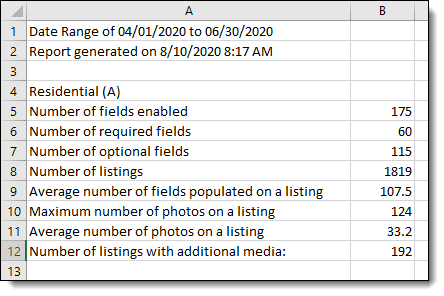
Copyright Data Report
If your MLS submits a quarterly copyright application, you will need to include statistics about your MLS database. The Copyright Data Report provides typically requested database information such as number of enabled fields, number of listings, and average number of photos on a listing.
To run the report, click Reports – General under General on the Admin menu. Then click Copyright Data Report.
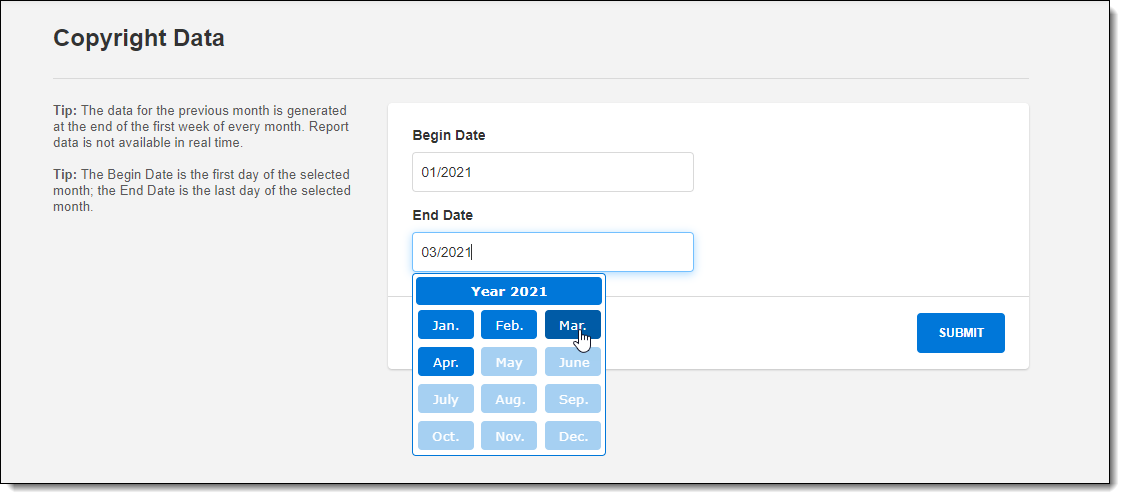
Specify a date range for the report. The begin date is the first day of the month selected in the Begin Date field. The end date is the last day of the month selected in the End Date field.
Note
Data is not available in real time. For performance reasons, report data is cached monthly. The data for the previous month is generated at the end of the first week of every month.
Click Run. A .csv file will be generated, which you can open in a spreadsheet program. The report lists statistics for each property type in your MLS.